
[LangChain] LangChain 15. LangGraph의 구조 설계
1. 개요
LangGraph를 이용한 기본적인 RAG 구조부터 AI Agent를 활용한 여러 구조 설계들에 대해서 알아보도록 하겠습니다.
2. LangGraph를 이용한 Naive RAG 구조 설계
예제 코드 실행에 필요한 라이브러리 설치부터 진행해 줍니다.
!pip install -U langchain-core langchain-community langchain-openai langchain-classic pdfplumber faiss-cpu langchain-teddynote
우선 예제 실행에 필요한 클래스와 함수를 미리 정의해 줍니다.
from langchain_core.prompts import load_prompt
from langchain_core.output_parsers import StrOutputParser
from langchain_community.vectorstores import FAISS
from langchain_openai import OpenAIEmbeddings, ChatOpenAI

from abc import ABC, abstractmethod
from operator import itemgetter
from langchain_classic import hub


class RetrievalChain(ABC):
    def __init__(self):
        self.source_uri = None
        self.k = 10

    @abstractmethod
    def load_documents(self, source_uris):
        """loader를 사용하여 문서를 로드합니다."""
        pass

    @abstractmethod
    def create_text_splitter(self):
        """text splitter를 생성합니다."""
        pass

    def split_documents(self, docs, text_splitter):
        """text splitter를 사용하여 문서를 분할합니다."""
        return text_splitter.split_documents(docs)

    def create_embedding(self):
        return OpenAIEmbeddings(model="text-embedding-3-small")

    def create_vectorstore(self, split_docs):
        return FAISS.from_documents(
            documents=split_docs, embedding=self.create_embedding()
        )

    def create_retriever(self, vectorstore):
        # MMR을 사용하여 검색을 수행하는 retriever를 생성합니다.
        dense_retriever = vectorstore.as_retriever(
            search_type="similarity", search_kwargs={"k": self.k}
        )
        return dense_retriever

    def create_model(self):
        return ChatOpenAI(model_name="gpt-4o-mini", temperature=0)

    def create_prompt(self):
        return hub.pull("teddynote/rag-prompt-chat-history")

    @staticmethod
    def format_docs(docs):
        return "\n".join(docs)

    def create_chain(self):
        docs = self.load_documents(self.source_uri)
        text_splitter = self.create_text_splitter()
        split_docs = self.split_documents(docs, text_splitter)
        self.vectorstore = self.create_vectorstore(split_docs)
        self.retriever = self.create_retriever(self.vectorstore)
        model = self.create_model()
        prompt = self.create_prompt()
        self.chain = (
            {
                "question": itemgetter("question"),
                "context": itemgetter("context"),
                "chat_history": itemgetter("chat_history"),
            }
            | prompt
            | model
            | StrOutputParser()
        )
        return self
from langchain_community.document_loaders import PDFPlumberLoader
from langchain_text_splitters import RecursiveCharacterTextSplitter
from typing import List, Annotated


class PDFRetrievalChain(RetrievalChain):
    def __init__(self, source_uri: Annotated[str, "Source URI"]):
        self.source_uri = source_uri
        self.k = 10

    def load_documents(self, source_uris: List[str]):
        docs = []
        for source_uri in source_uris:
            loader = PDFPlumberLoader(source_uri)
            docs.extend(loader.load())

        return docs

    def create_text_splitter(self):
        return RecursiveCharacterTextSplitter(chunk_size=300, chunk_overlap=50)
def format_docs(docs):
    return "\n".join(
        [
            f"<document><content>{doc.page_content}</content><source>{doc.metadata['source']}</source><page>{int(doc.metadata['page'])+1}</page></document>"
            for doc in docs
        ]
    )


def format_searched_docs(docs):
    return "\n".join(
        [
            f"<document><content>{doc['content']}</content><source>{doc['url']}</source></document>"
            for doc in docs
        ]
    )


def format_task(tasks):
    # 결과를 저장할 빈 리스트 생성
    task_time_pairs = []

    # 리스트를 순회하면서 각 항목을 처리
    for item in tasks:
        # 콜론(:) 기준으로 문자열을 분리
        task, time_str = item.rsplit(":", 1)
        # '시간' 문자열을 제거하고 정수로 변환
        time = int(time_str.replace("시간", "").strip())
        # 할 일과 시간을 튜플로 만들어 리스트에 추가
        task_time_pairs.append((task, time))

    # 결과 출력
    return task_time_pairs
2.1 기본 PDF 기반 Retrieval Chain 생성
이번 예제에서는 PDF 문서를 기반으로 Retrieval Chain을 생성합니다. 가장 단순한 구조의 Retrieval Chain입니다. 단, LangGraph에서는 Retriever와 Chain을 따로 생성합니다. 그래야 각 노드별로 세부 처리를 할 수 있습니다.
# pdf 문서를 로드 합니다.
pdf = PDFRetrievalChain(["/content/drive/MyDrive/LangChain/pdf_data/SPRI_AI_Brief_2023년12월호_F.pdf"]).create_chain()

# retriever와 chain을 생성합니다.
pdf_retriever = pdf.retriever
pdf_chain = pdf.chain
먼저, pdf_retriever를 사용하여 검색 결과를 가져옵니다.
search_result = pdf_retriever.invoke("앤스로픽에 투자한 기업과 투자금액을 알려주세요.")
search_result
Output:
[Document(id='45ac8bbf-d738-4751-a3bc-6afa8c85b05a', metadata={'source': '/content/drive/MyDrive/LangChain/pdf_data/SPRI_AI_Brief_2023년12월호_F.pdf', 'file_path': '/content/drive/MyDrive/LangChain/pdf_data/SPRI_AI_Brief_2023년12월호_F.pdf', 'page': 13, 'total_pages': 23, 'Author': 'dj', 'Creator': 'Hwp 2018 10.0.0.13462', 'Producer': 'Hancom PDF 1.3.0.542', 'CreationDate': "D:20231208132838+09'00'", 'ModDate': "D:20231208132838+09'00'", 'PDFVersion': '1.4'}, page_content='1. 정책/법제 2. 기업/산업 3. 기술/연구 4. 인력/교육\n구글, 앤스로픽에 20억 달러 투자로 생성 AI 협력 강화\nKEY Contents\nn 구글이 앤스로픽에 최대 20억 달러 투자에 합의하고 5억 달러를 우선 투자했으며, 앤스로픽은\n구글과 클라우드 서비스 사용 계약도 체결\nn 3대 클라우드 사업자인 구글, 마이크로소프트, 아마존은 차세대 AI 모델의 대표 기업인\n앤스로픽 및 오픈AI와 협력을 확대하는 추세\n£구글, 앤스로픽에 최대 20억 달러 투자 합의 및 클라우드 서비스 제공'),
 Document(id='59a28176-1366-4b68-b8b0-f46cdb93b5e2', metadata={'source': '/content/drive/MyDrive/LangChain/pdf_data/SPRI_AI_Brief_2023년12월호_F.pdf', 'file_path': '/content/drive/MyDrive/LangChain/pdf_data/SPRI_AI_Brief_2023년12월호_F.pdf', 'page': 13, 'total_pages': 23, 'Author': 'dj', 'Creator': 'Hwp 2018 10.0.0.13462', 'Producer': 'Hancom PDF 1.3.0.542', 'CreationDate': "D:20231208132838+09'00'", 'ModDate': "D:20231208132838+09'00'", 'PDFVersion': '1.4'}, page_content='£구글, 앤스로픽에 최대 20억 달러 투자 합의 및 클라우드 서비스 제공\nn 구글이 2023년 10월 27일 앤스로픽에 최대 20억 달러를 투자하기로 합의했으며, 이 중 5억\n달러를 우선 투자하고 향후 15억 달러를 추가로 투자할 방침\n∙ 구글은 2023년 2월 앤스로픽에 이미 5억 5,000만 달러를 투자한 바 있으며, 아마존도 지난 9월\n앤스로픽에 최대 40억 달러의 투자 계획을 공개\n∙ 한편, 2023년 11월 8일 블룸버그 보도에 따르면 앤스로픽은 구글의 클라우드 서비스 사용을 위해\n4년간 30억 달러 규모의 계약을 체결'),
 Document(id='f97ead3b-f369-4cdd-8202-f2f76f42a19c', metadata={'source': '/content/drive/MyDrive/LangChain/pdf_data/SPRI_AI_Brief_2023년12월호_F.pdf', 'file_path': '/content/drive/MyDrive/LangChain/pdf_data/SPRI_AI_Brief_2023년12월호_F.pdf', 'page': 13, 'total_pages': 23, 'Author': 'dj', 'Creator': 'Hwp 2018 10.0.0.13462', 'Producer': 'Hancom PDF 1.3.0.542', 'CreationDate': "D:20231208132838+09'00'", 'ModDate': "D:20231208132838+09'00'", 'PDFVersion': '1.4'}, page_content='4년간 30억 달러 규모의 계약을 체결\n∙ 오픈AI 창업자 그룹의 일원이었던 다리오(Dario Amodei)와 다니엘라 아모데이(Daniela Amodei)\n남매가 2021년 설립한 앤스로픽은 챗GPT의 대항마 ‘클로드(Claude)’ LLM을 개발\nn 아마존과 구글의 앤스로픽 투자에 앞서, 마이크로소프트는 차세대 AI 모델의 대표 주자인 오픈\nAI와 협력을 확대\n∙ 마이크로소프트는 오픈AI에 앞서 투자한 30억 달러에 더해 2023년 1월 추가로 100억 달러를'),
 Document(id='e9de9949-3336-4882-a2a2-7db6059e7019', metadata={'source': '/content/drive/MyDrive/LangChain/pdf_data/SPRI_AI_Brief_2023년12월호_F.pdf', 'file_path': '/content/drive/MyDrive/LangChain/pdf_data/SPRI_AI_Brief_2023년12월호_F.pdf', 'page': 13, 'total_pages': 23, 'Author': 'dj', 'Creator': 'Hwp 2018 10.0.0.13462', 'Producer': 'Hancom PDF 1.3.0.542', 'CreationDate': "D:20231208132838+09'00'", 'ModDate': "D:20231208132838+09'00'", 'PDFVersion': '1.4'}, page_content='투자하기로 하면서 오픈AI의 지분 49%를 확보했으며, 오픈AI는 마이크로소프트의 애저(Azure)\n클라우드 플랫폼을 사용해 AI 모델을 훈련\n£구글, 클라우드 경쟁력 강화를 위해 생성 AI 투자 확대\nn 구글은 수익률이 높은 클라우드 컴퓨팅 시장에서 아마존과 마이크로소프트를 따라잡고자 생성 AI를\n통한 기업 고객의 클라우드 지출 확대를 위해 AI 투자를 지속\n∙ 구글은 앤스로픽 외에도 AI 동영상 제작 도구를 개발하는 런웨이(Runway)와 오픈소스 소프트웨어\n기업 허깅 페이스(Hugging Face)에도 투자'),
 Document(id='46c47637-f00e-4dad-80b5-72edb180544f', metadata={'source': '/content/drive/MyDrive/LangChain/pdf_data/SPRI_AI_Brief_2023년12월호_F.pdf', 'file_path': '/content/drive/MyDrive/LangChain/pdf_data/SPRI_AI_Brief_2023년12월호_F.pdf', 'page': 1, 'total_pages': 23, 'Author': 'dj', 'Creator': 'Hwp 2018 10.0.0.13462', 'Producer': 'Hancom PDF 1.3.0.542', 'CreationDate': "D:20231208132838+09'00'", 'ModDate': "D:20231208132838+09'00'", 'PDFVersion': '1.4'}, page_content='▹ 삼성전자, 자체 개발 생성 AI ‘삼성 가우스’ 공개 ···························································10\n▹ 구글, 앤스로픽에 20억 달러 투자로 생성 AI 협력 강화 ················································11\n▹ IDC, 2027년 AI 소프트웨어 매출 2,500억 달러 돌파 전망···········································12'),
 Document(id='08dc4fef-5061-452a-8399-30dce7366e25', metadata={'source': '/content/drive/MyDrive/LangChain/pdf_data/SPRI_AI_Brief_2023년12월호_F.pdf', 'file_path': '/content/drive/MyDrive/LangChain/pdf_data/SPRI_AI_Brief_2023년12월호_F.pdf', 'page': 9, 'total_pages': 23, 'Author': 'dj', 'Creator': 'Hwp 2018 10.0.0.13462', 'Producer': 'Hancom PDF 1.3.0.542', 'CreationDate': "D:20231208132838+09'00'", 'ModDate': "D:20231208132838+09'00'", 'PDFVersion': '1.4'}, page_content='1. 정책/법제 2. 기업/산업 3. 기술/연구 4. 인력/교육\n미국 프런티어 모델 포럼, 1,000만 달러 규모의 AI 안전 기금 조성\nKEY Contents\nn 구글, 앤스로픽, 마이크로소프트, 오픈AI가 참여하는 프런티어 모델 포럼이 자선단체와 함께 AI\n안전 연구를 위한 1,000만 달러 규모의 AI 안전 기금을 조성\nn 프런티어 모델 포럼은 AI 모델의 취약점을 발견하고 검증하는 레드팀 활동을 지원하기 위한\n모델 평가 기법 개발에 자금을 중점 지원할 계획'),
 Document(id='99e555b5-2f1d-4f3b-8939-c7b5e9424632', metadata={'source': '/content/drive/MyDrive/LangChain/pdf_data/SPRI_AI_Brief_2023년12월호_F.pdf', 'file_path': '/content/drive/MyDrive/LangChain/pdf_data/SPRI_AI_Brief_2023년12월호_F.pdf', 'page': 9, 'total_pages': 23, 'Author': 'dj', 'Creator': 'Hwp 2018 10.0.0.13462', 'Producer': 'Hancom PDF 1.3.0.542', 'CreationDate': "D:20231208132838+09'00'", 'ModDate': "D:20231208132838+09'00'", 'PDFVersion': '1.4'}, page_content='1,000만 달러 이상을 기부\n∙ 또한 신기술의 거버넌스와 안전 분야에서 전문성을 갖춘 브루킹스 연구소 출신의 크리스 메서롤(Chris\nMeserole)을 포럼의 상무이사로 임명\nn 최근 AI 기술이 급속히 발전하면서 AI 안전에 관한 연구가 부족한 시점에, 포럼은 이러한 격차를 해소\n하기 위해 AI 안전 기금을 조성\n∙ 참여사들은 지난 7월 백악관 주재의 AI 안전 서약에서 외부자의 AI 시스템 취약점 발견과 신고를\n촉진하기로 약속했으며, 약속을 이행하기 위해 기금을 활용해 외부 연구집단의 AI 시스템 평가에\n자금을 지원할 계획'),
 Document(id='ae3c18d8-fe91-48de-910e-ad9522a7a55a', metadata={'source': '/content/drive/MyDrive/LangChain/pdf_data/SPRI_AI_Brief_2023년12월호_F.pdf', 'file_path': '/content/drive/MyDrive/LangChain/pdf_data/SPRI_AI_Brief_2023년12월호_F.pdf', 'page': 9, 'total_pages': 23, 'Author': 'dj', 'Creator': 'Hwp 2018 10.0.0.13462', 'Producer': 'Hancom PDF 1.3.0.542', 'CreationDate': "D:20231208132838+09'00'", 'ModDate': "D:20231208132838+09'00'", 'PDFVersion': '1.4'}, page_content='모델 평가 기법 개발에 자금을 중점 지원할 계획\n£프런티어 모델 포럼, 자선단체와 함께 AI 안전 연구를 위한 기금 조성\nn 구글, 앤스로픽, 마이크로소프트, 오픈AI가 출범한 프런티어 모델 포럼이 2023년 10월 25일 AI 안전\n연구를 위한 기금을 조성한다고 발표\n∙ 참여사들은 맥거번 재단(Patrick J. McGovern Foundation), 데이비드 앤 루실 패커드 재단(The\nDavid and Lucile Packard Foundation) 등의 자선단체와 함께 AI 안전 연구를 위한 기금에'),
 Document(id='5ce535c1-ffa7-4a67-b75f-e435cbe5ce2f', metadata={'source': '/content/drive/MyDrive/LangChain/pdf_data/SPRI_AI_Brief_2023년12월호_F.pdf', 'file_path': '/content/drive/MyDrive/LangChain/pdf_data/SPRI_AI_Brief_2023년12월호_F.pdf', 'page': 1, 'total_pages': 23, 'Author': 'dj', 'Creator': 'Hwp 2018 10.0.0.13462', 'Producer': 'Hancom PDF 1.3.0.542', 'CreationDate': "D:20231208132838+09'00'", 'ModDate': "D:20231208132838+09'00'", 'PDFVersion': '1.4'}, page_content='2. 기업/산업\n▹ 미국 프런티어 모델 포럼, 1,000만 달러 규모의 AI 안전 기금 조성································7\n▹ 코히어, 데이터 투명성 확보를 위한 데이터 출처 탐색기 공개 ·······································8\n▹ 알리바바 클라우드, 최신 LLM ‘통이치엔원 2.0’ 공개 ······················································9'),
 Document(id='0640388f-60e1-4f66-896c-9cb44faa15cf', metadata={'source': '/content/drive/MyDrive/LangChain/pdf_data/SPRI_AI_Brief_2023년12월호_F.pdf', 'file_path': '/content/drive/MyDrive/LangChain/pdf_data/SPRI_AI_Brief_2023년12월호_F.pdf', 'page': 9, 'total_pages': 23, 'Author': 'dj', 'Creator': 'Hwp 2018 10.0.0.13462', 'Producer': 'Hancom PDF 1.3.0.542', 'CreationDate': "D:20231208132838+09'00'", 'ModDate': "D:20231208132838+09'00'", 'PDFVersion': '1.4'}, page_content='자금을 지원할 계획\n£AI 안전 기금으로 AI 레드팀을 위한 모델 평가 기법 개발을 중점 지원할 계획\nn 프런티어 모델 포럼은 AI 안전 기금을 통해 AI 레드팀 활동을 위한 새로운 모델 평가 기법의 개발을\n중점 지원할 예정\n∙ 포럼에 따르면 AI 레드팀에 대한 자금 지원은 AI 모델의 안전과 보안 기준의 개선과 함께 AI 시스템\n위험 대응 방안에 관한 산업계와 정부, 시민사회의 통찰력 확보에 도움이 될 전망으로, 포럼은 향후 몇\n달 안에 기금 지원을 위한 제안 요청을 받을 계획')]
이전에 검색한 결과를 chain의 context로 전달합니다.
# 검색 결과를 기반으로 답변을 생성합니다.
answer = pdf_chain.invoke(
    {
        "question": "앤스로픽에 투자한 기업과 투자금액을 알려주세요.",
        "context": search_result,
        "chat_history": [],
    }
)
print(answer)
Output:
구글은 앤스로픽에 최대 20억 달러를 투자하기로 합의하였으며, 이 중 5억 달러를 우선 투자했습니다. 추가로 15억 달러를 향후 투자할 계획입니다.

**Source**
- /content/drive/MyDrive/LangChain/pdf_data/SPRI_AI_Brief_2023년12월호_F.pdf (page 13)
2.2 State 정의
from typing import Annotated, TypedDict
from langgraph.graph.message import add_messages

# GraphState 상태 정의
class GraphState(TypedDict):
    question: Annotated[str, "Question"] # 질문
    context: Annotated[str, "Context"] # 문서의 검색 결과
    answer: Annotated[str, "Answer"] # 답변
    messages: Annotated[str, add_messages] # 메시지(누적되는 list)
2.3 노드(Node) 정의
from langchain_teddynote.messages import messages_to_history

# 문서 검색 노드
def retrieve_document(state: GraphState) -> GraphState:
    # 질문을 상태에서 가져옵니다.
    latest_question = state["question"]

    # 문서에서 검색하여 관련성 있는 문서를 찾습니다.
    retrieved_docs = pdf_retriever.invoke(latest_question)

    # 검색된 문서를 형식화합니다. (프롬프트 입력으로 넣어주기 위함)
    retrieved_docs = format_docs(retrieved_docs)

    # 검색된 문서를 context 키에 저장합니다.
    return GraphState(context=retrieved_docs)

# 답변 생성 노드
def llm_answer(state: GraphState) -> GraphState:
    # 질문을 상태에서 가져옵니다.
    latest_question = state["question"]

    # 검색된 문서를 상태에서 가져옵니다.
    context = state["context"]

    # 체인을 호출하여 답변을 생성합니다.
    response = pdf_chain.invoke(
        {
            "question": latest_question,
            "context": context,
            "chat_history": messages_to_history(state["messages"]),
        }
    )
    # 생성된 답변, (유저의 질문, 답변) 메시지를 상태에 저장합니다.
    return GraphState(
        answer = response, messages=[("user", latest_question), ("assistant", response)]
    )
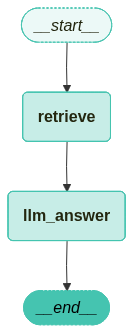
2.4 Edge 연결
from langgraph.graph import END, StateGraph
from langgraph.checkpoint.memory import MemorySaver

# 그래프 생성
workflow = StateGraph(GraphState)

# 노드 정의
workflow.add_node("retrieve", retrieve_document)
workflow.add_node("llm_answer", llm_answer)

# 엣지 정의
workflow.add_edge("retrieve", "llm_answer") # 검색 -> 답변
workflow.add_edge("llm_answer", END) # 답변 -> 종료

# 그래프 진입점 설정
workflow.set_entry_point("retrieve")

# 체크포인터 설정
memory = MemorySaver()

# 컴파일
app = workflow.compile(checkpointer=memory)
컴파일한 그래프를 시각화합니다.
from langchain_teddynote.graphs import visualize_graph

visualize_graph(app)
2.5 그래프 실행
from langchain_core.runnables import RunnableConfig
from langchain_teddynote.messages import stream_graph, random_uuid

# config 설정(재귀 최대 횟수, thread_id)
config = RunnableConfig(recursion_limit=20, configurable={"thread_id": random_uuid()})

# 질문 입력
inputs = GraphState(question="앤스로픽에 투자한 기업과 투자금액을 알려주세요.")

# 그래프 실행
stream_graph(app, inputs, config, node_names=["llm_answer"])
Output:

==================================================
🔄 Node: llm_answer 🔄
- - - - - - - - - - - - - - - - - - - - - - - - -
구글은 앤스로픽에 최대 20억 달러를 투자하기로 합의하였으며, 이 중 5억 달러를 우선 투자했습니다. 아마존은 앤스로픽에 최대 40억 달러의 투자 계획을 공개했습니다.

**Source**
- /content/drive/MyDrive/LangChain/pdf_data/SPRI_AI_Brief_2023년12월호_F.pdf (page 14)
outputs = app.get_state(config).values

print(f'Question: {outputs["question"]}')
print("===" * 20)
print(f'Answer:\n{outputs["answer"]}')
Output:
Question: 앤스로픽에 투자한 기업과 투자금액을 알려주세요.
============================================================
Answer:
구글은 앤스로픽에 최대 20억 달러를 투자하기로 합의하였으며, 이 중 5억 달러를 우선 투자했습니다. 아마존은 앤스로픽에 최대 40억 달러의 투자 계획을 공개했습니다.

**Source**
- /content/drive/MyDrive/LangChain/pdf_data/SPRI_AI_Brief_2023년12월호_F.pdf (page 14)
3. 관련성 검사(Relevance Checker) 모듈 추가
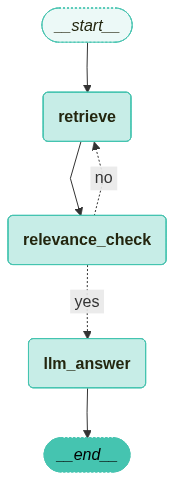
이전에 진행했던 Naive RAG Graph에 답변의 문서에 대한 관련성 체크를 추가해 보도록 하겠습니다. 필요한 라이브러리는 동일하며, 예제 실행에 필요한 기본적인 코드들은 이전 항목을 참고해 주시기 바랍니다.
3.1 기본 PDF 기반 Retrieval Chain 생성
# PDF 문서 로드
pdf = PDFRetrievalChain(["/content/drive/MyDrive/LangChain/pdf_data/SPRI_AI_Brief_2023년12월호_F.pdf"]).create_chain()

# retriever와 chain을 생성합니다.
pdf_retriever = pdf.retriever
pdf_chain = pdf.chain
3.2 Graph State 정의
이전 예제에서 동일하지만 관련성 체크를 위한 relevance 항목이 추가되었습니다.
from typing import Annotated, TypedDict
from langgraph.graph.message import add_messages

# GraphState 상태 정의
class GraphState(TypedDict):
    question: Annotated[str, "Question"] # 질문
    context: Annotated[str, "Context"] # 문서의 검색 결과
    answer: Annotated[str, "Answer"] # 답변
    messages: Annotated[str, add_messages] # 메시지(누적되는 list)
    relevance: Annotated[str, "Relevance"] # 관련성
3.3 노드(Node) 정의
이전 Naive RAG Graph에서 관련성 체크를 위한 relevance_check와 is_relevant 노드를 추가하였습니다.
from langchain_openai import ChatOpenAI
from langchain_teddynote.evaluator import GroundednessChecker
from langchain_teddynote.messages import messages_to_history

# 문서 검색 노드
def retrieve_document(state: GraphState) -> GraphState:
    # 질문을 상태에서 가져옵니다.
    latest_question = state["question"]

    # 문서에서 검색하여 관련성 있는 문서를 찾습니다.
    retrieved_docs = pdf_retriever.invoke(latest_question)

    # 검색된 문서를 형식화합니다. (프롬프트 입력으로 넣어주기 위함)
    retrieved_docs = format_docs(retrieved_docs)

    # 검색된 문서를 context 키에 저장합니다.
    return GraphState(context=retrieved_docs)

# 답변 생성 노드
def llm_answer(state: GraphState) -> GraphState:
    # 질문을 상태에서 가져옵니다.
    latest_question = state["question"]

    # 검색된 문서를 상태에서 가져옵니다.
    context = state["context"]

    # 체인을 호출하여 답변을 생성합니다.
    response = pdf_chain.invoke(
        {
            "question": latest_question,
            "context": context,
            "chat_history": messages_to_history(state["messages"]),
        }
    )

    # 생성된 답변, (유저의 질문 , 답변) 메시지를 상태에 저장합니다.
    return GraphState(
        answer=response, messages=[("user", latest_question), ("assistant", response)]
    )

# 관련성 체크 노드
def relevance_check(state: GraphState) -> GraphState:
    # 관련성 평가기를 생성합니다.
    question_answer_relevant = GroundednessChecker(
        llm=ChatOpenAI(model="gpt-4o-mini", temperature=0), target="question-retrieval"
    ).create()

    # 관련성 체크를 실행("yes" or "no")
    response = question_answer_relevant.invoke(
        {"question": state["question"], "context": state["context"]}
    )

    print("==== [RELEVANCE CHECK] ====")
    print(response.score)

    return GraphState(relevance=response.score)

# 관련성 체크하는 함수(router)
def is_relevant(state: GraphState) -> GraphState:
    return state["relevance"]
3.4 Graph Edge 정의
from langgraph.graph import END, StateGraph
from langgraph.checkpoint.memory import MemorySaver

# 그래프 정의
workflow = StateGraph(GraphState)

# 노드 추가
workflow.add_node("retrieve", retrieve_document)

# 관련성 체크 노드 추가
workflow.add_node("relevance_check", relevance_check)
workflow.add_node("llm_answer", llm_answer)

# 엣지 추가
workflow.add_edge("retrieve", "relevance_check")

# 조건부 엣지 추가
workflow.add_conditional_edges(
    "relevance_check",
    is_relevant,
    {
        "yes": "llm_answer",
        "no": "retrieve",
    },
)

# 그래프 진입점 설정
workflow.set_entry_point("retrieve")

# 체크포인터 설정
memory = MemorySaver()

# 그래프 컴파일
app = workflow.compile(checkpointer=memory)
그래프를 시각화합니다.
from langchain_teddynote.graphs import visualize_graph

visualize_graph(app)
3.5 그래프 실행
from langchain_core.runnables import RunnableConfig
from langchain_teddynote.messages import stream_graph, random_uuid

# config 설정
config = RunnableConfig(recursion_limit=20, configurable={"thread_id": random_uuid()})

# 질문 입력
inputs = GraphState(question="앤스로픽에 투자한 기업과 투자금액을 알려주세요.")

# 그래프 실행
stream_graph(app, inputs, config, node_names = ["relevance_check", "llm_answer"])
Output:

==================================================
🔄 Node: relevance_check 🔄
- - - - - - - - - - - - - - - - - - - - - - - - -
{"score":"yes"}==== [RELEVANCE CHECK] ====
yes

==================================================
🔄 Node: llm_answer 🔄
- - - - - - - - - - - - - - - - - - - - - - - - -
구글은 앤스로픽에 최대 20억 달러를 투자하기로 합의하였으며, 이 중 5억 달러를 우선 투자했습니다. 아마존은 앤스로픽에 최대 40억 달러의 투자 계획을 발표했습니다.

**Source**
- /content/drive/MyDrive/LangChain/pdf_data/SPRI_AI_Brief_2023년12월호_F.pdf (page 14)
outputs = app.get_state(config).values

print(f'Question: {outputs["question"]}')
print("===" * 20)
print(f'Answer:\n{outputs["answer"]}')
Output:
Question: 앤스로픽에 투자한 기업과 투자금액을 알려주세요.
============================================================
Answer:
구글은 앤스로픽에 최대 20억 달러를 투자하기로 합의하였으며, 이 중 5억 달러를 우선 투자했습니다. 아마존은 앤스로픽에 최대 40억 달러의 투자 계획을 발표했습니다.

**Source**
- /content/drive/MyDrive/LangChain/pdf_data/SPRI_AI_Brief_2023년12월호_F.pdf (page 14)
print(outputs["relevance"])
Output:
yes
그러면 관련성 검사를 실패했을 경우에 대해서도 알아보도록 하겠습니다.
from langgraph.errors import GraphRecursionError
from langchain_core.runnables import RunnableConfig

config = RunnableConfig(recursion_limit=10, configurable={"thread_id": random_uuid()})

# 질문 입력
inputs = GraphState(question="테디노트의 랭체인 튜토리얼에 대한 정보를 알려주세요.")

try:
    stream_graph(app, inputs, config, node_names=["relevance_check", "llm_answer"])
except GraphRecursionError as recursion_error:
    print(f"GraphRecursionError: {recursion_error}")
Output:

==================================================
🔄 Node: relevance_check 🔄
- - - - - - - - - - - - - - - - - - - - - - - - -
{"score":"no"}==== [RELEVANCE CHECK] ====
no
{"score":"no"}==== [RELEVANCE CHECK] ====
no
{"score":"no"}==== [RELEVANCE CHECK] ====
no
{"score":"no"}==== [RELEVANCE CHECK] ====
no
{"score":"no==== [RELEVANCE CHECK] ===="}
no
GraphRecursionError: Recursion limit of 10 reached without hitting a stop condition. You can increase the limit by setting the `recursion_limit` config key.
For troubleshooting, visit: https://docs.langchain.com/oss/python/langgraph/errors/GRAPH_RECURSION_LIMIT
4. 웹 검색 모듈 추가
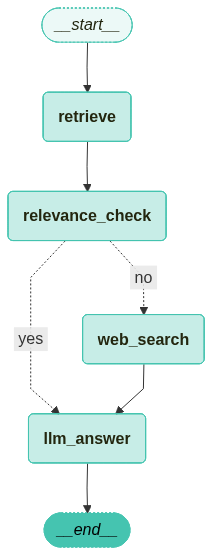
관련성 검사 노드를 추가한 그래프에 이제 관련성 검사를 실패했을 경우 웹 검색을 진행하도록 하는 그래프로 발전시켜 보도록 하겠습니다. 이전의 관련성 검사 예제에서 웹 검색 노드와 엣지를 추가한 그래프를 생성해 보도록 하겠습니다.
설치해야 하는 라이브러리와 이전 예제에서 사용되어 중복되는 코드들은 생략했습니다.
4.1 검색 노드 추가
TavilySearch 도구를 사용하여 Web Search를 수행하는 노드를 정의합니다.
from langchain_teddynote.tools.tavily import TavilySearch

# WebSearch 노드
def web_search(state: GraphState) -> GraphState:
    # 검색 도구 생성
    tavily_tool = TavilySearch()

    search_query = state["question"]

    # 다양한 파라미터를 사용한 검색 예제
    search_result = tavily_tool.search(
        query=search_query,
        topic="news",
        days=1,
        max_results=3,
        format_output=True,
    )

    return GraphState(context="\n".join(search_result))
4.2 Graph Edge 정의
from langgraph.graph import END, StateGraph
from langgraph.checkpoint.memory import MemorySaver

# 그래프 정의
workflow = StateGraph(GraphState)

# 노드 추가
workflow.add_node("retrieve", retrieve_document)
workflow.add_node("relevance_check", relevance_check)
workflow.add_node("llm_answer", llm_answer)

# Web Search 노드 추가
workflow.add_node("web_search", web_search) # 검색 -> 관련성 체크

# 엣지 추가
workflow.add_edge("retrieve", "relevance_check")

# 조건부 엣지 추가
workflow.add_conditional_edges(
    "relevance_check",
    is_relevant,
    {
        "yes": "llm_answer",
        "no": "web_search",
    },
)

workflow.add_edge("web_search", "llm_answer")
workflow.add_edge("llm_answer", END)

# 그래프 진입점 설정
workflow.set_entry_point("retrieve")

# 체크 포인터 설정
memory = MemorySaver()

# 그래프 컴파일
app = workflow.compile(checkpointer=memory)
컴파일한 그래프를 시각화합니다.
from langchain_teddynote.graphs import visualize_graph

visualize_graph(app)
4.3 그래프 실행
from langchain_core.runnables import RunnableConfig
from langchain_teddynote.messages import stream_graph, random_uuid


# config 설정(재귀 최대 횟수, thread_id)
config = RunnableConfig(recursion_limit=10, configurable={"thread_id": random_uuid()})

# 질문 입력
inputs = GraphState(question="도널드 트럼프 대통령")

# 그래프 실행
stream_graph(app, inputs, config, node_names=["relevance_check", "llm_answer"])
실행 결과를 보면 쿼리가 문서와는 관련이 없는 질문이기 때문에 관련성 검사를 진행하면 “no”가 나오게 되고 웹 검색을 실행하여 웸 검색 결과와 쿼리를 함께 LLM에 제공하여 답변을 얻어오는 것을 확인할 수 있습니다.
Output:

==================================================
🔄 Node: relevance_check 🔄
- - - - - - - - - - - - - - - - - - - - - - - - -
{"score":"no"}==== [RELEVANCE CHECK] ====
no

==================================================
🔄 Node: llm_answer 🔄
- - - - - - - - - - - - - - - - - - - - - - - - -
도널드 트럼프 대통령은 최근에 새로 창설한 평화 위원회(Board of Peace)의 일원들이 가자 재건을 위해 50억 달러를 약속했다고 발표했습니다. 이 위원회는 국제 안정화 및 경찰력에 수천 명의 인력을 배치할 계획입니다. 트럼프는 이 위원회가 역사상 가장 중요한 국제 기구가 될 것이라고 강조했습니다.

**Source**
- [Newsweek](https://www.newsweek.com/donald-trump-ranking-approval-rating-presidents-yougov-11526370)
- [AP News](https://apnews.com/article/trump-gaza-board-peace-reconstruction-stabilization-685251b3e8f24cf8779d6fe3f5f2ca04)
5. 쿼리 재작성 모듈 추가
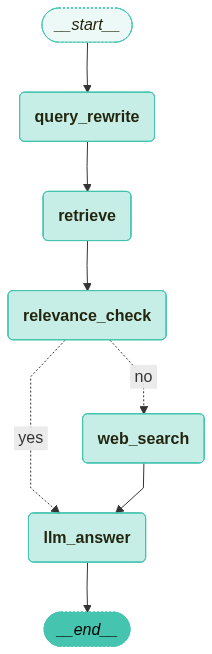
이전까지 웹 검색 노드를 추가한 그래프에 쿼리 재작성 노드를 추가한 그래프를 구성해 보도록 하겠습니다.
5.1 Query Rewrite 노드 추가
Query를 재작성하는 프롬프트를 활용하여 기존의 질문을 재작성합니다.
from langchain_core.prompts import PromptTemplate
from langchain_core.output_parsers import StrOutputParser

# Query Rewrite 프롬프트 정의
re_write_prompt = PromptTemplate(
    template = """Reformulate the given question to enhance its effectiveness for vectorstore retrieval.

- Analyze the initial question to identify areas for improvement such as specificity, clarity, and relevance.
- Consider the context and potential keywords that would optimize retrieval.
- Maintain the intent of the original question while enhancing its structure and vocabulary.

# Steps

1. **Understand the Original Question**: Identify the core intent and any keywords.
2. **Enhance Clarity**: Simplify language and ensure the question is direct and to the point.
3. **Optimize for Retrieval**: Add or rearrange keywords for better alignment with vectorstore indexing.
4. **Review**: Ensure the improved question accurately reflects the original intent and is free of ambiguity.

# Output Format

- Provide a single, improved question.
- Do not include any introductory or explanatory text; only the reformulated question.

# Examples

**Input**:
"What are the benefits of using renewable energy sources over fossil fuels?"

**Output**:
"How do renewable energy sources compare to fossil fuels in terms of benefits?"

**Input**:
"How does climate change impact polar bear populations?"

**Output**:
"What effects does climate change have on polar bear populations?"

# Notes

- Ensure the improved question is concise and contextually relevant.
- Avoid altering the fundamental intent or meaning of the original question.


[REMEMBER] Re-written question should be in the same language as the original question.

# Here is the original question that needs to be rewritten:
{question}
""",
    input_variables=["generation", "question"],
)

question_rewriter = (
    re_write_prompt | ChatOpenAI(model="gpt-4o-mini", temperature=0) | StrOutputParser()
)
# 질문 재작성
question = "앤스로픽에 투자한 미국기업"

question_rewriter.invoke({"question": question})
쿼리가 좀 더 구체적으로 변화하는 것을 확인할 수 있습니다.
Output:
앤스로픽에 투자한 미국 기업은 어떤 곳들이 있나요?
# Query Rewrite 노드 정의
def query_rewirte(state: GraphState) -> GraphState:
    latest_question = state["question"]
    question_rewritten = question_rewriter.invoke({"question": latest_question})
    return GraphState(question=question_rewritten)
5.2 Graph Edge 정의
from langgraph.graph import END, StateGraph
from langgraph.checkpoint.memory import MemorySaver

# 그래프 정의
workflow = StateGraph(GraphState)

# 노드 추가
workflow.add_node("retrieve", retrieve_document)
workflow.add_node("relevance_check", relevance_check)
workflow.add_node("llm_answer", llm_answer)
workflow.add_node("web_search", web_search)

# Query Rewrite 노드 추가
workflow.add_node("query_rewrite", query_rewirte)

# 엣지 추가
workflow.add_edge("query_rewrite", "retrieve")
workflow.add_edge("retrieve", "relevance_check")

# 조건부 엣지를 추가합니다.
workflow.add_conditional_edges(
    "relevance_check",
    is_relevant,
    {
        "yes": "llm_answer",
        "no": "web_search",
    },
)

workflow.add_edge("web_search", "llm_answer")
workflow.add_edge("llm_answer", END)

# 그래프 진입점 설정
workflow.set_entry_point("query_rewrite")

# 체크포인터 설정
memory = MemorySaver()

# 그래프 컴파일
app = workflow.compile(checkpointer=memory)
컴파일한 그래프를 시각화합니다.
from langchain_teddynote.graphs import visualize_graph

visualize_graph(app)
5.3 그래프 실행
from langchain_core.runnables import RunnableConfig
from langchain_teddynote.messages import stream_graph, random_uuid

# config 설정(재귀 최대 횟수, thread_id)
config = RunnableConfig(recursion_limit=10, configurable={"thread_id": random_uuid()})

# 질문 입력
inputs = GraphState(question="앤스로픽 투자 금액")

# 그래프 실행
stream_graph(app, inputs, config, node_names=["query_rewrite", "llm_answer"])
입력 쿼리인 “앤스로픽 투자 금액”이 “앤스로픽에 대한 투자 금액은 얼마인가요?”로 변경되는 것을 확인할 수 있습니다.
Output:

==================================================
🔄 Node: query_rewrite 🔄
- - - - - - - - - - - - - - - - - - - - - - - - -
앤스로픽에 대한 투자 금액은 얼마인가요?==== [RELEVANCE CHECK] ====
yes

==================================================
🔄 Node: llm_answer 🔄
- - - - - - - - - - - - - - - - - - - - - - - - -
구글은 앤스로픽에 최대 20억 달러를 투자하기로 합의하였으며, 이 중 5억 달러를 우선 투자하고 향후 15억 달러를 추가로 투자할 계획입니다.

**Source**
- /content/drive/MyDrive/LangChain/pdf_data/SPRI_AI_Brief_2023년12월호_F.pdf (page 14)
6. Agentic RAG
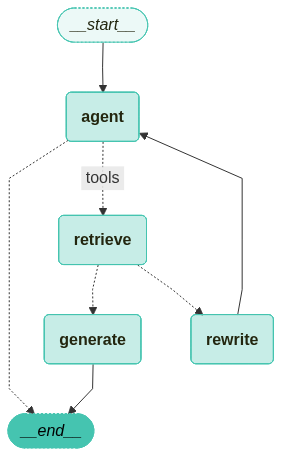
일반적인 Naive RAG를 넘어 Agent 기반의 Agentic RAG를 구현해 보도록 하겠습니다.
6.1 Retrieve 도구 정의
Agent에 사용할 Retrieve 도구를 정의합니다. 예제 코드에 사용된 pdf_retriever는 이전 예제들에서 정의한 것을 그대로 사용했습니다.
from langchain_core.tools.retriever import create_retriever_tool
from langchain_core.prompts import PromptTemplate

# PDF 문서를 기반으로 검색 도구 생성
retriever_tool = create_retriever_tool(
    pdf_retriever,
    "pdf_retriever",
    "Search and return information about SPRI Brief PDF file. It contains useful information on recent AI trends. The document is published on Dec 2023.",
    document_prompt=PromptTemplate.from_template(
        "<document><context>{page_content}</context><metadata><source>{source}</source><page>{page}</page></metadata></document>"
    ),
)

# 생성된 검색 도구를 도구 리스트에 추가하여 에이전트에서 사용 가능하도록 설정
tools = [retriever_tool]
6.2 Agent Graph 정의
6.2.1 Agent State 정의
from typing import Annotated, Sequence, TypedDict
from langchain_core.messages import BaseMessage
from langgraph.graph.message import add_messages

# 에이전트 상태를 정의하는 타입 딕셔너리, 메시지 시퀀스를 관리하고 추가 동작 정의
class AgentState(TypedDict):
    # add_messages reducer 함수를 사용하여 메시지 시퀀스를 관리
    messages: Annotated[Sequence[BaseMessage], add_messages]
6.2.2 노드와 엣지 정의
from typing import Literal
from langchain_classic import hub
from langchain_core.messages import HumanMessage
from langchain_core.output_parsers import StrOutputParser
from langchain_core.prompts import PromptTemplate
from pydantic import BaseModel, Field
from langchain_openai import ChatOpenAI
from langgraph.prebuilt import tools_condition
from langchain_teddynote.models import get_model_name, LLMs

# 최신 모델이름 가져오기
MODEL_NAME = get_model_name(LLMs.GPT4)

# 데이터 모델 정의
class grade(BaseModel):
    """A binary score for relevance checks"""

    binary_score: str = Field(
        description="Response 'yes' if the document is relevant to the question or 'no' if it is not."
    )

def grade_documents(state) -> Literal["generate", "rewrite"]:
    # LLM 모델 초기화
    model = ChatOpenAI(temperature=0, model=MODEL_NAME, streaming=True)

    # 구조화된 출력을 위한 LLM 설정
    llm_with_tool = model.with_structured_output(grade)

    # 프롬프트 템플릿 정의
    prompt = PromptTemplate(
        template="""You are a grader assessing relevance of a retrieved document to a user question. \n
        Here is the retrieved document: \n\n {context} \n\n
        Here is the user question: {question} \n
        If the document contains keyword(s) or semantic meaning related to the user question, grade it as relevant. \n
        Give a binary score 'yes' or 'no' score to indicate whether the document is relevant to the question.""",
        input_variables=["context", "question"],
    )

    # llm + tool 바인딩 체인 생성
    chain = prompt | llm_with_tool

    # 현재 상태에서 메시지 추출
    messages = state["messages"]

    # 가장 마지막 메시지 추출
    last_message = messages[-1]

    # 원래 질문 추출
    question = messages[0].content

    # 검색된 문서 추출
    retrieved_docs = last_message.content

    # 관련성 평가 실행
    scored_result = chain.invoke({"question": question, "context": retrieved_docs})

    # 관련성 여부 추출
    score = scored_result.binary_score

    # 관련성 여부에 따른 결정
    if score == "yes":
        print("==== [DECISION: DOCS RELEVANT] ====")
        return "generate"
    else:
        print("==== [DECISION: DOCS NOT RELEVANT] ====")
        print(score)
        return "rewrite"

def agent(state):
    # 현재 상태에서 메시지 추출
    messages = state["messages"]

    # LLM 모델 초기화
    model = ChatOpenAI(temperature=0, streaming=True, model=MODEL_NAME)

    # retriever tool 바인딩
    model = model.bind_tools(tools)

    # 에이전트 응답 생성
    response = model.invoke(messages)

    # 기존 리스트에 추가되므로 리스트 형태로 반환
    return {"messages": [response]}

def rewrite(state):
    print("==== [QUERY REWRITE] ====")

    # 현재 상태에서 메시지 추출
    messages = state["messages"]

    # 원래 질문 추출
    question = messages[0].content

    # 질문 개선을 위한 프롬프트 구성
    msg = [
        HumanMessage(
            content=f""" \n
    Look at the input and try to reason about the underlying semantic intent / meaning. \n
    Here is the initial question:
    \n ------- \n
    {question}
    \n ------- \n
    Formulate an improved question: """,
        )
    ]

    # LLM 모델로 질문 개선
    model = ChatOpenAI(temperature=0, model=MODEL_NAME, streaming=True)

    # Query-Transform 체인 실행
    response = model.invoke(msg)

    # 재작성된 질문 반환
    return {"messages": [response]}

def generate(state):
    # 현재 상태에서 메시지 추출
    messages = state["messages"]

    # 원래 질문 추출
    question = messages[0].content

    # 가장 마지막 메시지 추출
    docs = messages[-1].content

    # RAG 프롬프트 템플릿 가져오기
    prompt = hub.pull("teddynote/rag-prompt")

    # LLM 모델 초기화
    llm = ChatOpenAI(model_name=MODEL_NAME, temperature=0, streaming=True)

    # RAG 체인 구성
    rag_chain = prompt | llm | StrOutputParser()

    # 답변 생성 실행
    response = rag_chain.invoke({"context": docs, "question": question})
    return {"messages": [response]}
6.2.3 그래프 정의
from langgraph.graph import END, StateGraph, START
from langgraph.prebuilt import ToolNode

workflow = StateGraph(AgentState)

workflow.add_node("agent", agent)
retrieve = ToolNode([retriever_tool])
workflow.add_node("retrieve", retrieve)
workflow.add_node("rewrite", rewrite)
workflow.add_node("generate", generate)

# 시작점에서 에이전트 노드로 연결
workflow.add_edge(START, "agent")

# 검색 여부 결정을 위한 조건부 엣지 추가
workflow.add_conditional_edges(
    "agent",
    # 에이전트 결정 평가
    tools_condition,
    {
        "tools": "retrieve",
        END: END
    },
)

# 액션 노드 실행 후 처리될 엣지 정의
workflow.add_conditional_edges(
    "retrieve",
    # 문서 품질 평가
    grade_documents,
)
workflow.add_edge("generate", END)
workflow.add_edge("rewrite", "agent")

graph = workflow.compile()
그래프를 시각화 합니다.
from langchain_teddynote.graphs import visualize_graph

visualize_graph(graph)
from langchain_teddynote.messages import stream_graph
from langchain_core.runnables import RunnableConfig

config = RunnableConfig(recursion_limit=10, configurable={"thread_id": "1"})

inputs = {
    "messages":[
        ("user", "삼성전자가 개발한 생성형 AI의 이름은?"),
    ]
}

# 그래프 실행
stream_graph(graph, inputs, config, node_names=["agent", "rewrite", "generate"])
Output:

==================================================
🔄 Node: agent 🔄
- - - - - - - - - - - - - - - - - - - - - - - - -
삼성전자가 개발한 생성형 AI의 이름은 **"삼성 Gauss(가우스)"**입니다.

2023년 11월, 삼성전자는 자체 개발한 생성형 AI 모델인 "Samsung Gauss"를 공개했습니다. 이 모델은 자연어 처리, 코드 생성, 이미지 생성 등 다양한 분야에 활용될 수 있도록 설계되었습니다. "Gauss"라는 이름은 수학자 카를 프리드리히 가우스(Carl Friedrich Gauss)에서 따온 것으로, 인공지능의 핵심 원리 중 하나인 '정규분포(Gaussian distribution)'와도 연관이 있습니다.
아래는 문서 검색이 불필요한 질문의 예시입니다.
inputs = {
    "messages": [
        ("user", "대한민국의 수도는?"),
    ]
}

# 그래프 실행
stream_graph(graph, inputs, config, node_names=["agent", "rewrite", "generate"])
Output:

==================================================
🔄 Node: agent 🔄
- - - - - - - - - - - - - - - - - - - - - - - - -
대한민국의 수도는 서울특별시(서울)입니다.
7. Adaptive RAG
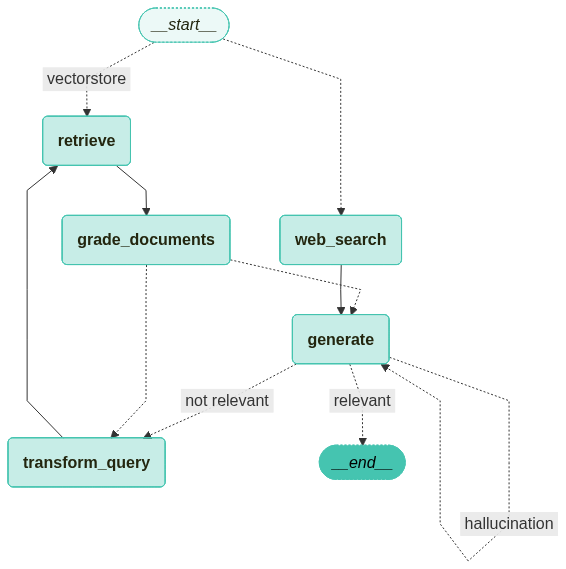
Adaptive RAG는 쿼리 분석과 능동적/자기 수정 RAG를 결합하여 다양한 데이터 소스에서 정보를 검색하고 생성하는 전략입니다. 이번에는 LangGraph를 사용하여 웹 검색과 자기 수정 RAG 간의 라우팅 구현 예제로 Adaptive RAG에 대해서 알아보도록 하겠습니다.
주로 다루는 내용은 다음과 같습니다.
- Create Index: 인덱스 생성 및 문서 로드
- LLMs: LLM을 사용한 쿼리 라우팅 및 문서 평가
- Web Search Tool: 웹 검색 도구 설정
- Construct the Graph: 그래프 상태 및 흐름 정의
- Compile Graph: 그래프 컴파일 및 워크플로우 구축
- Use Graph: 그래프 실행 및 결과 확인
7.1 기본 PDF 기반 Retrieval Chain 생성
이전에 진행했던 예제들과 동일하므로 생략하도록 하겠습니다.
7.2 쿼리 라우팅과 문서 평가
LLMs 단계에서는 쿼리 라우팅과 문서 평가를 수행합니다. 이 과정은 Adaptive RAG의 중요한 부분으로, 효율적인 정보 검색과 생성에 기여합니다.
- 쿼리 라우팅: 사용자의 쿼리를 분석하여 적절한 정보 소스로 라우팅합니다. 이를 통해 쿼리의 목적에 맞는 최적의 검색 경로를 설정할 수 있습니다.
- 문서 평가: 검색된 문서의 품질과 관련성을 평가하여 최종 결과의 정확성을 높입니다. 이 과정은 LLMs의 성능을 극대화하는데 필수적입니다.
이 단계는 Adaptive RAG의 핵심 기능을 지원하며, 정확하고 신뢰할 수 있는 정보 제공을 목표로 합니다.
from typing import Literal

from langchain_core.prompts import ChatPromptTemplate
from pydantic import BaseModel, Field
from langchain_openai import ChatOpenAI
from langchain_teddynote.models import get_model_name, LLMs

# 최신 LLM 모델 이름 가져오기
MODEL_NAME = get_model_name(LLMs.GPT4)

# 사용자 쿼리를 가장 관련성 높은 데이터 소스로 라우팅하는 데이터 모델
class RouteQuery(BaseModel):
    """Route a user query to the most relevant datasource."""

    # 데이터 소스 선택을 위한 리터럴 타입 필드
    datasource: Literal["vectorstore", "web_search"] = Field(
        ...,
        description="Given a user question choose to route it to web search or a vectorstore",
    )

# LLM 초기화 및 함수 호출을 통한 구조화된 출력 생성
llm = ChatOpenAI(model=MODEL_NAME, temperature=0)
structured_llm_router = llm.with_structured_output(RouteQuery)

# 시스템 메시지와 사용자 질문을 포함한 프롬프트
system = """You are an expert at routing a user question to a vectorstore or web search.
The vectorstore contains documents related to DEC 2023 AI Brief Report(SPRI) with Samsung Gause, Anthropic, etc.
Use the vectorstore for questions on these topics. Otherwise, use web-search."""

# Routing을 위한 프롬프트 템플릿 생성
route_prompt = ChatPromptTemplate.from_messages(
    [
        ("system", system),
        ("human", "{question}"),
    ]
)

# 프롬프트 템플릿과 구조화된 LLM 라우터를 결합하여 질문 라우터 생성
question_router = route_prompt | structured_llm_router
쿼리 라우팅 결과를 테스트 해본 뒤 결과를 확인해 봅니다.
# 문서 검색이 필요한 질문
print(
    question_router.invoke(
        {"question": "AI Brief에서 삼성전자가 만든 생성형 AI의 이름은?"}
    )
)
Output:
datasource='vectorstore'
# 웹 검색이 필요한 질문
print(question_router.invoke({"question": "판교에서 가장 맛있는 딤섬집 찾아줘"}))
Output:
datasource='web_search'
7.3 검색 평가기(Retrieval Grader)
from pydantic import BaseModel, Field
from langchain_openai import ChatOpenAI
from langchain_core.prompts import ChatPromptTemplate

# 문서 평가를 위한 데이터 모델 정의
class GradeDocuments(BaseModel):
    """Binary score for relevance check on retrieved documents."""

    binary_score: str = Field(
        description="Documents are relevant to the question, 'yes' or 'no'"
    )

# LLM 초기화 및 함수 호출을 통한 구조화된 출력 생성
llm = ChatOpenAI(model=MODEL_NAME, temperature=0)
structured_llm_grader = llm.with_structured_output(GradeDocuments)

# 시스템 메시지와 사용자 질문을 포함한 프롬프트 템플릿 생성
system = """You are a grader assessing relevance of a retrieved document to a user question. \n
    If the document contains keyword(s) or semantic meaning related to the user question, grade it as relevant. \n
    It does not need to be a stringent test. The goal is to filter out erroneous retrievals. \n
    Give a binary score 'yes' or 'no' score to indicate whether the document is relevant to the question."""

grade_prompt = ChatPromptTemplate.from_messages(
    [
        ("system", system),
        ("human", "Retrieved document: \n\n {document} \n\n User question: {question}"),
    ]
)

# 문서 검색결과 평가기 생성
retrieval_grader = grade_prompt | structured_llm_grader
생성한 retrieval_grader를 사용하여 문서 검색결과를 평가해 봅니다.
question = "삼성전자가 만든 생성형 AI의 이름은?"

# 질문에 대한 관련 문서 검색
docs = pdf_retriever.invoke(question)

# 검색된 문서의 내용 가져오기
retrieved_doc = docs[1].page_content

# 평가 결과 출력
print(retrieval_grader.invoke({"question": question, "document": retrieved_doc}))
Output:
binary_score='yes'
7.4 답변 생성을 위한 RAG 체인 생성
from langchain_classic import hub
from langchain_core.output_parsers import StrOutputParser
from langchain_openai import ChatOpenAI

# LangChain Hub에서 프롬프트 가져오기(RAG 프롬프트는 자유롭게 수정 가능)
prompt = hub.pull("teddynote/rag-prompt")

# LLM 초기화
llm = ChatOpenAI(model_name=MODEL_NAME, temperature=0)

# 문서 포맷팅 함수
def format_docs(docs):
    return "\n\n".join(
        [
            f'<document><content>{doc.page_content}</content><source>{doc.metadata["source"]}</source><page>{doc.metadata["page"]+1}</page></document>'
            for doc in docs
        ]
    )

# RAG 체인 생성
rag_chain = prompt | llm | StrOutputParser()
이제 생성한 rag_chain에 질문을 전달하여 답변을 생성합니다.
# RAG 체인에 질문을 전달하여 답변 생성
generation = rag_chain.invoke({"context": format_docs(docs), "question": question})
print(generation)
Output:
삼성전자가 만든 생성형 AI의 이름은 ‘삼성 가우스’(Samsung Gauss)이다.

**Source**
- /content/drive/MyDrive/LangChain/pdf_data/SPRI_AI_Brief_2023년12월호_F.pdf (p.13)
7.5 답변의 Hallucination 체커 추가
# 할루시네이션 체크를 위한 데이터 모델 정의
class GradeHallucinations(BaseModel):
    """Binary score for hallucination present in generation answer."""

    binary_score: str = Field(
        description="Answer is grounded in the facts, 'yes' or 'no'"
    )

# 함수 호출을 통한 LLM 초기화
llm = ChatOpenAI(model=MODEL_NAME, temperature=0)
structured_llm_grader = llm.with_structured_output(GradeHallucinations)

# 프롬프트 설정
system = """You are a grader assessing whether an LLM generation is grounded in / supported by a set of retrieved facts. \n
    Give a binary score 'yes' or 'no'. 'Yes' means that the answer is grounded in / supported by the set of facts."""

# 프롬프트 템플릿 생성
hallucination_prompt = ChatPromptTemplate.from_messages(
    [
        ("system", system),
        ("human", "Set of facts: \n\n {documents} \n\n LLM generation: {generation}"),
    ]
)

# 환각 평가기 생성
hallucination_grader = hallucination_prompt | structured_llm_grader
생성한 hallucination_grader를 사용하여 생성된 답변의 환각 여부를 평가합니다.
# 평가기를 사용하여 생성된 답변의 환각 여부 평가
hallucination_grader.invoke({"documents": docs, "generation": generation})
Output:
GradeHallucinations(binary_score='yes')
7.6 답변 평가기 추가
LLM으로부터 생성된 답변을 평가하는 평가기를 추가합니다.
class GradeAnswer(BaseModel):
    """Binary scoring to evaluate the appropriateness of answers to questions"""

    binary_score: str = Field(
        description="Indicate 'yes' or 'no' whether the answer solves the question"
    )

# 함수 호출을 통한 LLM 초기화
llm = ChatOpenAI(model=MODEL_NAME, temperature=0)
structured_llm_grader = llm.with_structured_output(GradeAnswer)

# 프롬프트 설정
system = """You are a grader assessing whether an answer addresses / resolves a question \n
     Give a binary score 'yes' or 'no'. Yes' means that the answer resolves the question."""
answer_prompt = ChatPromptTemplate.from_messages(
    [
        ("system", system),
        ("human", "User question: \n\n {question} \n\n LLM generation: {generation}"),
    ]
)

# 프롬프트 템플릿과 구조화된 LLM 평가기를 결합하여 답변 평가기 생성
answer_grader = answer_prompt | structured_llm_grader
# 평가기를 사용하여 생성된 답변이 질문을 해결하는지 여부 평가
answer_grader.invoke({"question": question, "generation": generation})
Output:
GradeAnswer(binary_score='yes')
7.7 쿼리 재작성
from langchain_openai import ChatOpenAI
from langchain_core.prompts import ChatPromptTemplate
from langchain_core.output_parsers import StrOutputParser

llm = ChatOpenAI(model=MODEL_NAME, temperature=0)

system = """You a question re-writer that converts an input question to a better version that is optimized \n
for vectorstore retrieval. Look at the input and try to reason about the underlying semantic intent / meaning."""

# Query Rewriter 프롬프트 템플릿 생성
re_write_prompt = ChatPromptTemplate.from_messages(
    [
        ("system", system),
        (
            "human",
            "Here is the initial question: \n\n {question} \n Formulate an improved question."
        ),
    ]
)

# Query Rewriter 생성
question_rewriter = re_write_prompt | llm | StrOutputParser()
구축한 question_rewriter에 질문을 전달하여 개선된 질문을 생성합니다.
# 질문 재작성기에 질문을 전달하여 개선된 질문 생성
question_rewriter.invoke({"question": question})
Output:
삼성전자가 개발한 생성형 인공지능(AI) 서비스 또는 플랫폼의 공식 명칭은 무엇인가?
7.8 웹 검색 도구
웹 검색 도구는 Adaptive RAG의 중요한 구성 요소로, 최신 정보를 검색하는데 사용됩니다. 이 도구는 사용자가 최신 이벤트와 관련된 질문에 대해 신속하고 정확한 답변을 얻을 수 있도록 지원합니다. 웹 검색 도구로는 예제에 항상 사용하던 TavilySearch를 사용합니다.
from langchain_teddynote.tools.tavily import TavilySearch

# 웹 검색 도구 생성
web_search_tool = TavilySearch(max_results=3)
7.9 그래프 구성
7.9.1 그래프 상태 정의
from typing import List
from typing_extensions import TypedDict, Annotated

class GraphState(TypedDict):
    """
    그래프의 상태를 나타내는 데이터 모델

    Attributes:
        question: 질문
        generation: LLM 생성된 답변
        documents: 도큐먼트 리스트
    """

    question: Annotated[str, "User question"]
    generation: Annotated[str, "LLM generated answer"]
    documents: Annotated[List[str], "List of documents"]
7.9.2 그래프 흐름 정의
그래프의 흐름을 정의하여 Adaptive RAG의 작동 방식을 명확히 합니다. 이 단계에서는 그래프의 상태와 전환을 설정하여 쿼리 처리의 효율성을 높입니다 .
- 상태 정의: 그래프의 각 상태를 명확히 정의하여 쿼리의 진행 상황을 추적합니다.
- 전환 설정: 상태 간의 전환을 설정하여 쿼리가 적절한 경로를 따라 진행되도록 합니다.
- 흐름 최적화: 그래프의 흐름을 최적화하여 정보 검색과 생성의 정확성을 향상시킵니다.
7.9.3 노드 정의
from langchain_core.documents import Document

# 문서 검색 노드
def retrieve(state):
    print("==== [RETRIEVE] ====")
    question = state["question"]

    # 문서 검색 수행
    documents = pdf_retriever.invoke(question)
    return {"documents": documents, "question": question}

# 답변 생성 노드
def generate(state):
    print("==== [GENERATE] ====")
    # 질문과 문서 검색 결과 가져오기
    question = state["question"]
    documents = state["documents"]

    # RAG 답변 생성
    generation = rag_chain.invoke({"context": documents, "question": question})
    return {"documents": documents, "question": question, "generation": generation}

def grade_documents(state):
    print("==== [CHECK DOCUMENT RELEVANCE TO QUESTION] ====")
    # 질문과 문서 검색 결과 가져오기
    question = state["question"]
    documents = state["documents"]

    # 각 문서에 대한 관련성 점수 계산
    filtered_docs = []
    for d in documents:
        score = retrieval_grader.invoke(
            {"question": question, "document": d.page_content}
        )
        grade = score.binary_score
        if grade == "yes":
            print("---GRADE: DOCUMENT RELEVANT---")
            # 관련성이 있는 문서 추가
            filtered_docs.append(d)
        else:
            # 관련성이 없는 문서는 건너뛰기
            print("---GRADE: DOCUMENT NOT RELEVANT---")
            continue
    return {"documents": filtered_docs, "question": question}

# 질문 재작성 노드
def transform_query(state):
    print("====- [TRANSFORM QUERY] ====")
    # 질문과 문서 검색 결과 가져오기
    question = state["question"]
    documents = state["documents"]

    # 질문 재작성
    better_question = question_rewriter.invoke({"question": question})
    return {"documents": documents, "question": better_question}

# 웹 검색 노드
def web_search(state):
    print("==== [WEB SEARCH] ====")

    # 질문과 문서 검색 결과 가져오기
    question = state["question"]

    # 웹 검색 수행
    web_results = web_search_tool.invoke({"query": question})
    web_results_docs = [
        Document(
            page_content=web_result["content"],
            metadata={"source": web_result["url"]},
        )
        for web_result in web_results
    ]

    return {"documents": web_results_docs, "question": question}
7.9.4 엣지 정의
# 질문 라우팅 노드
def route_question(state):
    print("==== [ROUTE QUESTION] ====")

    # 질문 가져오기
    question = state["question"]

    # 질문 라우팅
    source = question_router.invoke({"question": question})

    # 질문 라우팅 결과에 따른 노드 라우팅
    if source.datasource == "web_search":
        print("==== [ROUTE QUESTION TO WEB SEARCH] ====")
        return "web_search"
    elif source.datasource == "vectorstore":
        print("==== [ROUTE QUESTION TO VECTORSTORE] ====")
        return "vectorstore"

# 문서 관련성 평가 노드
def decide_to_generate(state):
    print("==== [DECISION TO GENERATE] ====")
    # 질문과 문서 검색 결과 가져오기
    question = state["question"]
    filtered_documents = state["documents"]

    if not filtered_documents:
        # 모든 문서가 관련성 없는 경우 질문 재작성
        print(
            "==== [DECISION: ALL DOCUMENTS ARE NOT RELEVANT TO QUESTION, TRANSFORM QUERY] ===="
        )
        return "transform_query"
    else:
        # 관련성 있는 문서가 있는 경우 답변 생성
        print("==== [DECISION: GENERATE] ====")
        return "generate"

def hallucination_check(state):
    print("==== [CHECK HALLUCINATIONS] ====")

    # 질문과 문서 검색 결과 가져오기
    question = state["question"]
    documents = state["documents"]
    generation = state["generation"]

    # 환각 평가
    score = hallucination_grader.invoke(
        {"documents": documents, "generation": generation}
    )
    grade = score.binary_score

    # Hallucination 여부 확인
    if grade == "yes":
        print("==== [DECISION: GENERATION IS GROUNDED IN DOCUMENTS] ====")

        # 답변의 관련성(Relevance) 평가
        print("==== [GRADE GENERATED ANSWER vs QUESTION] ====")
        score = answer_grader.invoke({"question": question, "generation": generation})
        grade = score.binary_score

        # 관련성 평가 결과에 따른 처리
        if grade == "yes":
            print("==== [DECISION: GENERATED ANSWER ADDRESSES QUESTION] ====")
            return "relevant"
        else:
            print("==== [DECISION: GENERATED ANSWER DOES NOT ADDRESS QUESTION] ====")
            return "not_relevant"
    else:
        print("==== [DECISION: GENERATION IS NOT GROUNDED IN DOCUMENTS, RE-TRY] ====")
        return "hallucination"
7.9.5 그래프 컴파일
그래프 컴파일 단계에서는 Adaptive RAG의 워크플로우를 구축하고 실행 가능한 상태로 만듭니다. 이 과정은 그래프의 각 노드와 엣지를 연결하여 쿼리 처리의 전체 흐름을 정의합니다.
from langgraph.graph import END, StateGraph, START
from langgraph.checkpoint.memory import MemorySaver

workflow = StateGraph(GraphState)

# 노드 정의
workflow.add_node("web_search", web_search)
workflow.add_node("retrieve", retrieve)
workflow.add_node("grade_documents", grade_documents)
workflow.add_node("generate", generate)
workflow.add_node("transform_query", transform_query)

workflow.add_conditional_edges(
    START,
    route_question,
    {
        "web_search": "web_search",
        "vectorstore": "retrieve",
    },
)

workflow.add_edge("web_search", "generate")
workflow.add_edge("retrieve", "grade_documents")
workflow.add_conditional_edges(
    "grade_documents",
    decide_to_generate,
    {
        "transform_query": "transform_query",
        "generate": "generate",
    },
)

workflow.add_edge("transform_query", "retrieve")
workflow.add_conditional_edges(
    "generate",
    hallucination_check,
    {
        "hallucination": "generate",
        "relevant": END,
        "not relevant": "transform_query",
    },
)

# 그래프 컴파일
app = workflow.compile(checkpointer=MemorySaver())
그래프를 시각화 합니다.
from langchain_teddynote.graphs import visualize_graph

visualize_graph(app)
7.9.6 그래프 사용
그래프 사용 단계에서는 Adaptive RAG의 실행을 통해 쿼리 처리 결과를 확인합니다. 이 과정은 각 노드와 엣지를 따라 쿼리를 처리하여 최종 결과를 생성합니다.
from langchain_teddynote.messages import stream_graph
from langchain_core.runnables import RunnableConfig
import uuid

# config 설정(재귀 최대 횟수, thread_id)
config = RunnableConfig(recursion_limit=20, configurable={"thread_id": uuid.uuid4()})

# 질문 입력
inputs = {
    "question": "삼성전자가 개발한 생성형 AI 의 이름은?",
}

# 그래프 실행
stream_graph(app, inputs, config, node_names=["agent", "rewrite", "generate"])
Output:
==== [ROUTE QUESTION] ====
==== [ROUTE QUESTION TO VECTORSTORE] ====
==== [RETRIEVE] ====
==== [CHECK DOCUMENT RELEVANCE TO QUESTION] ====
---GRADE: DOCUMENT RELEVANT---
---GRADE: DOCUMENT RELEVANT---
---GRADE: DOCUMENT RELEVANT---
---GRADE: DOCUMENT RELEVANT---
---GRADE: DOCUMENT NOT RELEVANT---
---GRADE: DOCUMENT NOT RELEVANT---
---GRADE: DOCUMENT RELEVANT---
---GRADE: DOCUMENT RELEVANT---
---GRADE: DOCUMENT NOT RELEVANT---
---GRADE: DOCUMENT NOT RELEVANT---
==== [DECISION TO GENERATE] ====
==== [DECISION: GENERATE] ====
==== [GENERATE] ====

==================================================
🔄 Node: generate 🔄
- - - - - - - - - - - - - - - - - - - - - - - - -
삼성전자가 개발한 생성형 AI의 이름은 ‘삼성 가우스’이다.

**Source**
- /content/drive/MyDrive/LangChain/pdf_data/SPRI_AI_Brief_2023년12월호_F.pdf (p.12)==== [CHECK HALLUCINATIONS] ====
{"binary_score":"yes"}==== [DECISION: GENERATION IS GROUNDED IN DOCUMENTS] ====
==== [GRADE GENERATED ANSWER vs QUESTION] ====
{"binary_score":"yes"}==== [DECISION: GENERATED ANSWER ADDRESSES QUESTION] ====
마무리
이번 포스트에서는 LangGraph를 이용한 RAG의 구조 설계에 대해서 알아보았습니다. 기본적인 Native RAG에 여러 도구를 하나씩 추가해 보았고, 이를 통합한 Agentic RAG 구축도 진행해 보았습니다. 최종적으로는 검색된 문서뿐만 아니라 LLM이 생성한 답변에 대한 환각 현상 검사와 답변의 품질 검사까지 진행하는 도구를 정의하여 노드로 만들어 Adaptive RAG까지 구현해 보았습니다.
긴 글 읽어주셔서 감사드리며, 본문 내용 중에 잘못된 내용이나 오타 궁금하신 사항이 있으실 경우 댓글 남겨주시기 바랍니다.
참조
- 테디노트 - LangChain 한국어 튜토리얼KR(https://wikidocs.net/book/14314)
Comments